




 Instock Online, Qty
Left
Instock Online, Qty
Left
 Order Now & Free Shipping & Support COD
 Today 10:00 AM - 10:00 PM
 Sale ends in:


About this item
- Triple-fold Clasp, Stainless Steel Band , Mineral Glass, Water Resistant
- Dual time, 1/100-second stopwatch Measuring capacity: 59’59.99″ Measuring mode: Elapsed time, Daily alarm
- Hourly time signal, Auto-calendar (28 days for February) ,12/24-hour format
- Regular timekeeping Analog: 2 hands (Hour, minute) Digital: Hour, minutes, seconds, pm, month, date, day, Accuracy: ’30 seconds per month, Approx. battery life: 3 years on SR920W Close
- Size of case : 51.9’47’12mm, Total weight : 95g
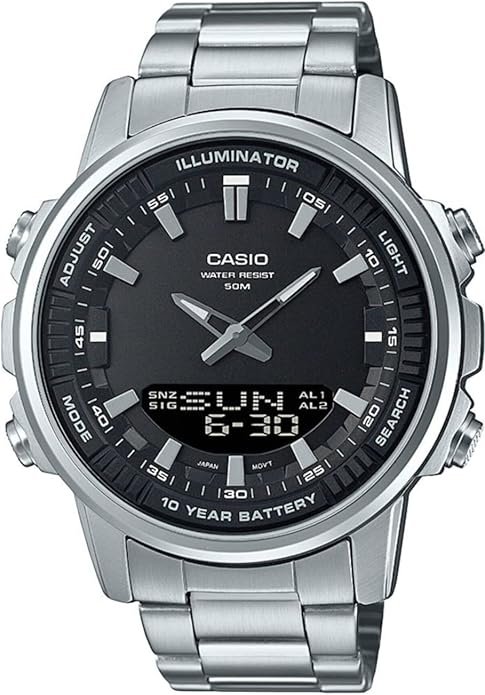
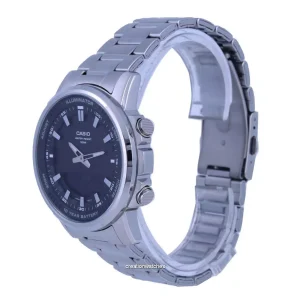
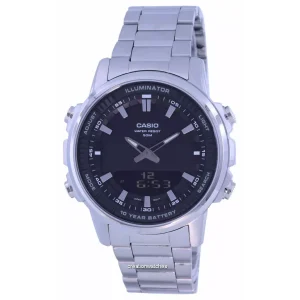
 A front view of the Casio AMW-880D-1A watch, featuring a silver-tone stainless steel band and case, a black dial with analog hands, and a digital display at the bottom. The watch face shows ‘ILLUMINATOR’, ‘CASIO WATER RESIST 50M’, and ’10 YEAR BATTERY’. Buttons labeled ‘ADJUST’, ‘MODE’, ‘LIGHT’, and ‘SEARCH’ are visible on the sides.
Setup
Initial Time Setting
Upon first use or after a battery change, you may need to set the time and date. Refer to the ‘Operating’ section for detailed instructions on adjusting digital and analog time.
Adjusting the Band
The watch comes with a stainless steel triple-fold clasp band. To ensure a comfortable fit, the band length may need to be adjusted by removing or adding links. It is recommended to have this done by a qualified jeweler or watch technician.
Battery Information
This watch is powered by one SR920W product-specific battery, which is included. The approximate battery life is 3 years. When the battery runs low, the digital display may dim or the watch may stop functioning. Replace the battery promptly to ensure continued operation.
Operating Instructions
The Casio AMW-880D-1A features four buttons for operation:?ADJUST?(top left),?MODE?(bottom left),?LIGHT?(top right), and?SEARCH?(bottom right).
Timekeeping Mode
In regular timekeeping mode, the analog hands display the current time, while the digital display shows the hour, minutes, seconds, PM indicator, month, date, and day.
- Setting Digital Time and Date:
- Press and hold the?ADJUST?button until the city code starts flashing.
- Use the?SEARCH?and?LIGHT?buttons to select your desired city code (time zone).
- Press the?MODE?button to cycle through settings: DST (Daylight Saving Time), 12/24-hour format, seconds, hour, minute, year, month, day.
- Use?SEARCH?and?LIGHT?to change the flashing value.
- Press?ADJUST?to exit the setting mode.
- Setting Analog Time:?The analog hands automatically synchronize with the digital time. If they are misaligned, refer to the manual’s specific section for analog hand correction (often found under ‘Home Position Adjustment’ or similar).
- 12/24-Hour Format:?Toggle between 12-hour and 24-hour timekeeping during the digital time setting process.
- Auto-Calendar:?The watch features an auto-calendar that automatically adjusts for different month lengths, including February (28 days).
World Time Mode
This mode allows you to view the current time in various cities around the world.
- Press the?MODE?button to navigate to the World Time mode.
- Use the?SEARCH?and?LIGHT?buttons to scroll through different city codes.
Stopwatch Mode
The 1/100-second stopwatch measures elapsed time with a capacity of 59 minutes, 59.99 seconds.
- Press?MODE?button to navigate to the Stopwatch mode.
- Press?SEARCH?to start/stop the stopwatch.
- Press?ADJUST?to reset the stopwatch to zero while it is stopped.
Alarm Mode
The watch features a daily alarm and an hourly time signal.
- Press the?MODE?button to navigate to the Alarm mode.
- Setting the Alarm:
- While in Alarm mode, press and hold?ADJUST?until the alarm time starts flashing.
- Use?MODE?to select the hour or minute setting.
- Use?SEARCH?and?LIGHT?to change the flashing value.
- Press?ADJUST?to exit the setting mode.
- Turning Alarm/Hourly Signal On/Off:?Use?SEARCH?to toggle the alarm (AL1, AL2) and hourly time signal (SIG) on or off.
- Stopping the Alarm:?Press any button to stop the alarm sound after it begins.
Illuminator (Light)
Press the?LIGHT?button to illuminate the digital display for easy viewing in low-light conditions.
Maintenance
Water Resistance
The Casio AMW-880D-1A is water resistant to 50 meters (5 ATM). This means it is suitable for everyday use and can withstand splashes or brief immersion in water. It is not recommended for swimming, diving, or prolonged water activities. Avoid operating buttons while the watch is wet.
Cleaning
To clean the watch, wipe it with a soft, dry cloth. For the stainless steel band, a slightly damp cloth can be used, followed by a dry cloth. Avoid using chemical cleaners or abrasive materials, as these can damage the watch’s finish.
Battery Replacement
When the battery needs replacement, it is highly recommended to take the watch to an authorized Casio service center or a reputable watch repair shop. Improper battery replacement can compromise the watch’s water resistance and internal components.
Troubleshooting
Digital Display is Blank or Dim
- Cause:?Low battery.
- Solution:?Replace the battery (SR920W).
Analog Hands Do Not Match Digital Time
- Cause:?Analog hands may have shifted due to impact or magnetic interference.
- Solution:?Perform an analog hand home position adjustment. Refer to the full Casio manual for your specific model for detailed steps, as this procedure can vary.
Buttons Are Unresponsive
- Cause:?Watch may be in a specific mode that restricts button function, or internal issue.
- Solution:?Try pressing the?MODE?button repeatedly to cycle through modes. If unresponsive, the battery may be critically low, or there may be an internal malfunction requiring professional service.
Specifications
| Model Number | AMW-880D-1A |
| Case Dimensions (H’W’D) | 51.9 ‘ 47 ‘ 12 mm |
| Total Weight | 95 g |
| Water Resistance | 50 meters (5 ATM) |
| Battery Type | SR920W |
| Approx. Battery Life | 3 years |
| Accuracy | ’30 seconds per month |
| Glass | Mineral Glass |
| Clasp Type | Push Button Deployment Clasp |
Warranty and Support
For warranty information, please refer to the warranty card included with your purchase or visit the official Casio website. For technical support or service inquiries, please contact Casio customer service directly. Keep your proof of purchase for any warranty claims.